OOP Counter
A simple object-oriented programming project that demonstrates the use of classes and methods to create a functional counter application.
Overview
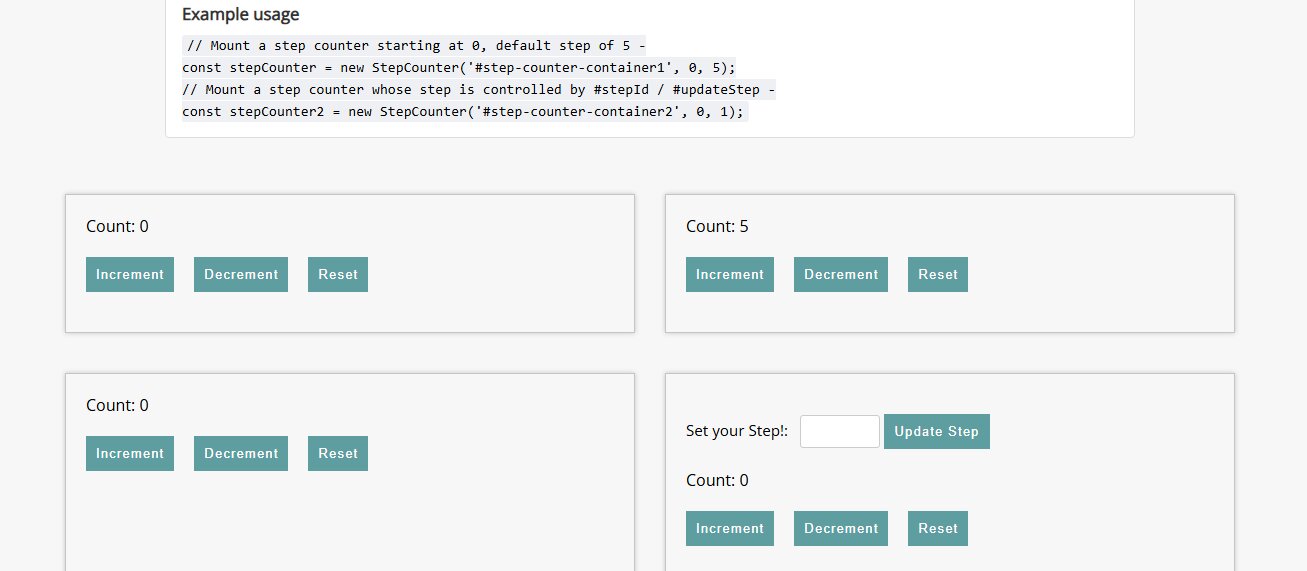
This project is a demo-focused website that uses a JavaScript counter to explain Object-Oriented Programming concepts in a practical, interactive format. The goal was not only to make a working app, but to present the logic in a way that feels educational, similar to documentation and learning platforms. The page structure emphasizes clarity, readability, and semantic organization.
My Role
- Designed and developed the full project independently.
- Implemented the counter with JavaScript OOP patterns.
- Structured the page as a learning and demo resource.
- Wrote semantic HTML to organize explanations and examples.
- Created a documentation-style layout focused on readability.
The Challenge
Teaching Through Code: Unlike a typical build where functionality is the only priority, this project needed to communicate concepts clearly. I had to ensure the code organization was understandable, the UI supported learning, and ideas were introduced in a logical flow.
Documentation-Style Structure: I aimed to emulate the feel of platforms like MDN and W3Schools, which required deliberate semantic markup, clear hierarchy, and consistent formatting throughout the page.
Process
1. OOP Implementation
The core feature is a JavaScript counter class that encapsulates state and behavior. I used class properties to track values and class methods to handle increment, decrement, and reset actions.
This approach keeps the logic modular, reusable, and easy to scale for future features.
2. Semantic HTML Structure
I used semantic elements such as code and pre blocks to present examples clearly like w3schools or MDN. Proper heading hierarchy improved accessibility and navigation.
3. Demo Layout and Interactive Learning
Documentation Feel: The layout separates explanation from live interaction, with typography and spacing tuned for easier reading.
Live Demonstration: Users can interact with the counter in real time and directly observe how OOP structure controls behavior.
Learning Reinforcement: The combination of explanation and hands-on interaction helps connect abstract concepts to practical results.
Results and Takeaways
This project helped bridge implementation and instruction, showing how technical work can be communicated more effectively through structure and presentation. It reinforced the value of writing code that is both functional and understandable.
- Readable code matters just as much as working code in educational contexts.
- Semantic HTML has a major impact on clarity and accessibility.
- Intentional structure is essential when designing projects as learning tools.
Reflection and Conclusion
This demo pushed me to think beyond implementation and focus on communication. By modeling the experience after documentation platforms, I created a project that teaches as well as it functions. The OOP Counter Demo highlights both technical understanding and my ability to present concepts in a clean, maintainable, user-friendly format.